Published on 11 min read
Claude Connectors vs MCP vs Skills vs Plugins - What Goes Where
Claude connectors vs MCP vs skills vs plugins: what each one does, where it's configured and why a tool shows up in the Claude app but not in Claude Code.
TL;DR
A connector is an MCP server added to the claude.ai account, while a local MCP server is one configured in Claude Code, and both give Claude tools. A skill gives it knowledge that loads only when a task needs it, and a plugin is a package that bundles the two. Anything added to the account works in the Claude app and follows us into Claude Code, while anything added on the machine stays there. When a tool is missing, /mcp, /status and /skills in Claude Code show where it came from.
Claude gets a lot more useful once it's connected to the tools we already work with, like Notion, Slack or a local database. The catch is that there are several ways to do it - connectors, local MCP servers, skills and plugins - and the names get mixed up pretty easily, especially when the same tool shows up both in the Claude app and in Claude Code.
In this article, we'll break down what each one is, where it's configured and where it's available. One distinction runs through all of it: tools (what Claude can do) versus knowledge (how Claude should do it). Connectors and local MCP servers give Claude tools, skills give it knowledge, and a plugin is a package that can carry both. A second distinction decides where each one shows up, and it comes down to whether we added it to our Claude account or to our machine:
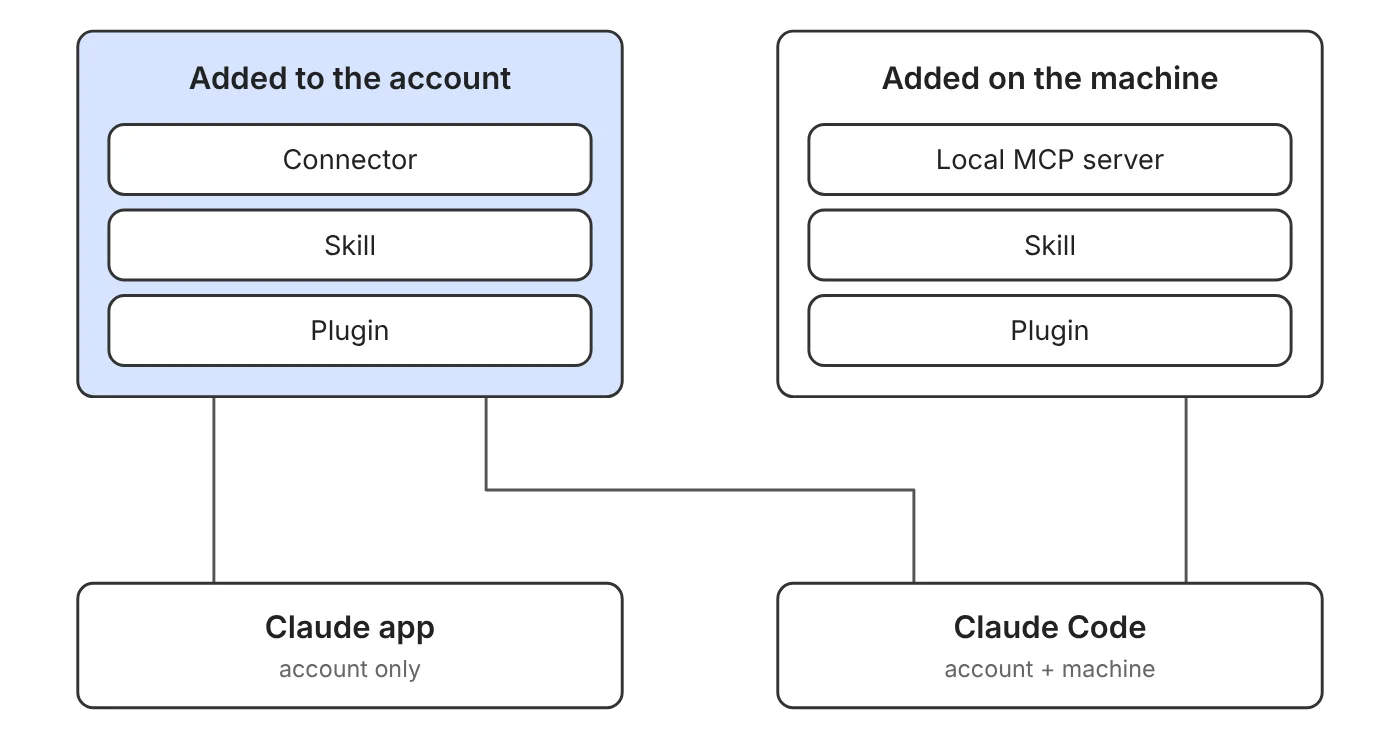
The account is the one we sign in with at claude.ai. Whatever we add to it is saved on Anthropic's side rather than on a device, so it shows up wherever we sign in: the Claude app (web, desktop and mobile) and Claude Code. The machine is the computer Claude Code runs on. Whatever we add there is saved as files, in our home directory (like ~/.claude/) or inside a repo (like .mcp.json), and only Claude Code reads them.
The examples are available as a repo on GitHub. The details here reflect Claude Code 2.1.288, and some of them (like syncing skills and plugins from the account) need a recent version.
What Is MCP
The Model Context Protocol (MCP) is an open standard for connecting AI applications to external systems. An MCP server exposes a set of tools, such as "search pages" in Notion or "send a message" in Slack, and Claude decides when to call them based on the task at hand.
The important thing is that connectors, local MCP servers and the MCP servers inside plugins all speak this same protocol. From Claude's point of view, a tool is a tool. What differs is where the server is configured, where it runs and which Claude products can see it.
Connectors
A connector is an MCP server added to our Claude account at claude.ai (under Customize > Connectors). It belongs to the account, so it's available in the Claude app and in Claude Code without any extra setup.
Connectors added to the account are remote servers that run in the cloud, and we authorize each one once (usually by signing in to the service). That authorization carries over to every product, so a connector that's ready in the chat is ready in the terminal too. One catch: Claude Code loads connectors only when we're signed in with a claude.ai subscription. With an API key or a third-party provider like Amazon Bedrock, they don't show up.
What connectors can't do is reach something that only exists on our machine, like a dev database, since Claude calls them from Anthropic's cloud.
Local MCP Servers
A local MCP server is one we add to Claude Code ourselves. It's configured on our machine, so it's only available in Claude Code - the chat at claude.ai doesn't know it exists.
Let's add DBHub, a server that lets Claude query a local development database (here, the Postgres database from the example repo):
claude mcp add --scope project db -- npx -y @bytebase/dbhub --dsn "postgres://reader:reader@localhost:5433/dev?sslmode=disable"The --scope flag decides who gets it. The default is a scope that's also called local, which keeps the server for us in the current project. user makes it available across all our projects, and project writes it into a .mcp.json file at the repo root:
{
  "mcpServers": {
    "db": {
      "type": "stdio",
      "command": "npx",
      "args": ["-y", "@bytebase/dbhub", "--dsn", "postgres://reader:reader@localhost:5433/dev?sslmode=disable"],
      "env": {}
    }
  }
}
Since .mcp.json is committed with the code, everyone who clones the repo gets the same server (Claude Code asks each of them to approve it before first use). In the example repo the file is already there, so starting the database with docker compose up -d and approving the server is all it takes. Its database has a small posts table, so we can ask Claude something like "Which posts aren't published yet?".
The approval matters because an MCP server runs code on our machine and reads whatever we point it at. A server that fetches external content can also expose Claude to prompt injection (instructions hidden inside that content). The safe default is to connect only servers we trust, and to give a database server a read-only user. That's why the DSN above connects as reader: a DELETE through this server fails with permission denied for table posts.
Most local servers run as a process on our machine, which is what gives them access to local things like a dev database or the file system. A local config can also point at a remote server over HTTP:
claude mcp add --transport http notion https://mcp.notion.com/mcpSo "local" is really about where the server is configured, not where it runs.
Skills
Now for the one that isn't about tools. A skill is a folder with a SKILL.md file - instructions, and optionally templates or scripts - that teaches Claude how to handle a specific kind of task, like this one from the example repo:
---
name: release-notes
description: Writes release notes from merged pull requests. Use when asked for a changelog or release notes.
---

Collect the pull requests merged since the last tag and group them
into Features, Fixes and Internal. Write one line per change in the
past tense and skip dependency bumps.
Only the name and description sit in Claude's context by default. When a task matches the description, Claude loads the full instructions, and in Claude Code we can also trigger a skill directly with /release-notes. That's what keeps a large collection of skills cheap: they cost almost nothing until they're needed.
Some skills ship with Claude Code itself. The /design-sync command we used in the previous post to sync a design system with Claude Design is one of them.
Claude Code has one more source of knowledge: CLAUDE.md, an instructions file that's loaded into every session. A skill, by contrast, loads only when a task needs it. So facts that always apply belong in CLAUDE.md (in the example repo: the database is read-only and commits follow Conventional Commits), and a longer procedure that's only needed sometimes belongs in a skill.
CLAUDE.md has two relatives. CLAUDE.local.md sits next to it for personal notes we keep out of git, like local paths or test data. AGENTS.md is the cross-tool version, an open format that agents like Codex, Cursor, GitHub Copilot and Windsurf read too. Claude Code falls back to it when the project has no CLAUDE.md or CLAUDE.local.md, so a team can keep one instructions file for all of them.
Skills follow the same account-versus-machine split as MCP servers. A skill enabled on our account (under Customize in the Claude app) works in the chat and is synced into Claude Code sessions signed in with that account. A skill we write on our machine lives in ~/.claude/skills/ (personal) or .claude/skills/ inside the repo (shared with the team), and it's available only in Claude Code.
Tools and skills also work well together. An MCP server gives Claude access to Notion, while a skill can explain how our blog database there is structured and what a finished post should look like.
Plugins
A plugin is how a combination like that gets packaged. It isn't a new kind of capability, just a bundle of several extensions we can install in one step, such as skills, MCP servers, subagents (specialized agents Claude hands a task to) and hooks (scripts that run on events like a file edit).
The example repo has one called blog-tools, which bundles exactly that pair: the Notion MCP server and a blog-post skill.
There are two ways to add one. In Claude Code, plugins are distributed through marketplaces (a git repo or URL with a catalog of plugins). We add the marketplace once, and then install from it inside a session:
/plugin marketplace add nitayneeman/claude-connectors-vs-mcp-vs-skills-vs-plugins-example
/plugin install blog-tools@example-marketplace
The example-marketplace part is the name set in the repo's .claude-plugin/marketplace.json. Once the plugin is installed, /mcp lists its Notion server and lets us authorize it. From there, assuming our Notion workspace has a database called "Blog", asking Claude to "draft a blog post about MCP servers" puts both pieces to work: the blog-post skill tells Claude how the database is structured, and the Notion server creates the page. The skill can also be triggered directly with /blog-tools:blog-post.
A plugin installed from Claude Code stays on the machine and isn't added to the account. The other way is Customize > Plugins in the Claude app, where the plugin is saved to our account instead: it works in the chat and reaches Claude Code as a synced plugin at the next session start.
Under the hood, a plugin is just a folder. It can include a manifest at .claude-plugin/plugin.json, and the MCP servers it brings are defined in a .mcp.json at its root - the same format we used for the DBHub server.
Not every part loads everywhere, though. Plain chat conversations pick up a plugin's skills and remote MCP servers, but skip its hooks, subagents and local MCP servers, and the platform support table has the full breakdown.
Comparing Them
Let's put it all in one table, split by where each piece is added:
| Item | Gives Claude | Added to the account | Added on the machine |
|---|---|---|---|
| MCP server | Tools | A connector | claude mcp add or .mcp.json |
| Skill | Knowledge | Enabled under Customize | A folder with SKILL.md |
| Plugin | A bundle of both | Installed under Customize | /plugin install |
The rule is the same in every row: what we add to the account follows us into Claude Code, and what we add on a machine stays there. One exception is the Claude desktop app, which can also run local MCP servers of its own, installed as desktop extensions.
Picking one is mostly about where we need it. A service we want in every conversation, like Notion or Google Drive, belongs in a connector, while something tied to a project or to our machine belongs in a local MCP server. A repeatable way of working that we'd otherwise explain again and again is a skill, and a ready-made setup that someone else packaged comes as a plugin.
Troubleshooting
A missing tool usually comes down to one question: where was it added? Claude Code has a few commands that answer it.
/mcp lists every server with its origin: the claude.ai prefix marks a connector (like claude.ai Notion), a plugin: prefix marks a server that came from a plugin (like plugin:blog-tools:notion), and everything else was configured locally. If a connector is missing from the list, /status shows which login is active, since connectors need a claude.ai subscription rather than an API key. A server from .mcp.json that doesn't load is usually still waiting for approval, and claude mcp list shows it as pending.
Skills have the same kind of view. /skills lists everything that's loaded, with the ones synced from the account grouped under claude.ai sync.
The opposite case is simpler. When something works in Claude Code but not in the chat, it was most likely added on the machine, and the chat only sees what's on the account.
Wrapping Up
We covered the four ways to extend Claude and the two distinctions behind them - tools versus knowledge, and account versus machine:
- MCP is the open protocol behind every external tool we connect to Claude, and connectors, local servers and plugins all use it.
- A connector is an MCP server on the claude.ai account.
- A local MCP server is one configured in Claude Code with
claude mcp addor.mcp.json. - A skill gives Claude knowledge rather than tools, and it loads only when a task needs it.
- A plugin is a package that can bring MCP servers along with skills, subagents and hooks.
- Whatever we add to the account follows us into Claude Code, while whatever we add on a machine stays on that machine.
- When something is missing,
/mcpand/skillsshow where each piece came from, and/statusshows which login is active.
Here's the full project with everything we covered.
You’re welcome to share:
Join My Newsletter
Get new posts directly to your inbox.
Comments are powered by DisqusDetails
Loading comments activates Disqus, which collects information as a third-party service.
The site owner has no access to or control over the information collected by Disqus.
Related Posts

How to Sync a Design System with Claude Design
17 min read
Syncing React components into Claude Design with /design-sync: what the mirror holds, how it's verified and a step-by-step example with shadcn/ui, Tailwind v4 and Storybook.
Read post

How AI Works Under the Hood - LLMs Explained with Code
23 min read
A walkthrough of how AI works at the Large Language Model level. From tokenization and embeddings to self-attention and generation with JavaScript implementations explaining the inference pipeline.
Read post

ECMAScript - Introducing Deferred Module Evaluation with import defer
8 min read
Introducing the “import defer” proposal, a new ECMAScript import form that loads and links modules eagerly while deferring their evaluation until a namespace property is first accessed - currently at stage 3 in the TC39 process.
Read post